Tag: Home Protection
  • Home Security System Installation: Cost & Features Guide

    Home Security System Installation: Cost & Features Guide

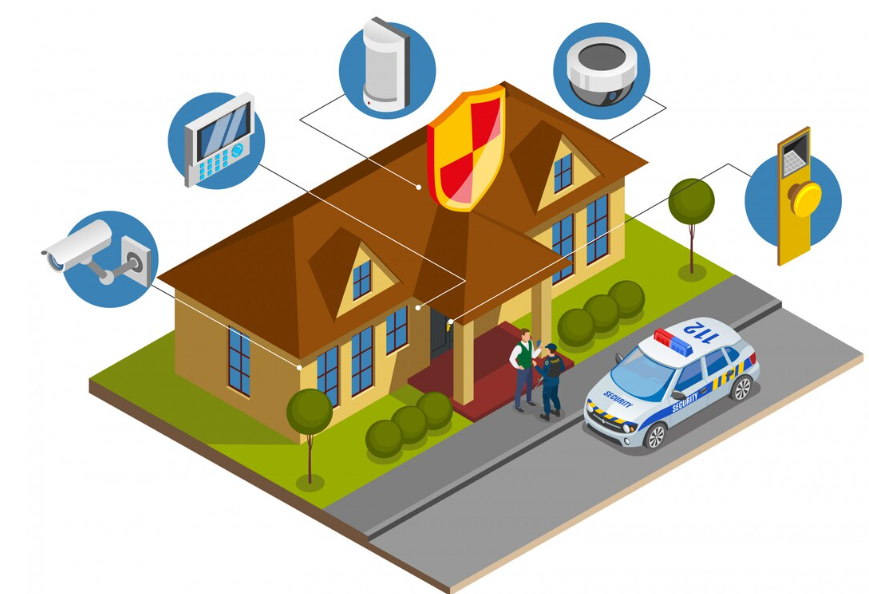
    Choosing the right Home Security System Installation: Cost & Features Guide can help you protect your property while staying within budget. Modern home security systems offer much more than a basic alarm. Many now include cameras, motion sensors, smart locks, doorbell cameras, mobile alerts, and professional monitoring.

    However, the total cost can vary widely. Equipment, installation, monitoring, property size, and smart home features all affect the final price. Some homeowners prefer a simple DIY system. Others want a professionally installed solution with 24/7 monitoring.

    This guide explains home security system installation costs, important features, installation options, monitoring fees, and questions to ask before choosing a provider. The goal is to help you compare options and select a system that matches your home and budget.

    How Much Does Home Security System Installation Cost?

    The cost of a home security system depends on the equipment and installation requirements. A basic system with a hub, entry sensors, and motion detection can cost a few hundred dollars. Larger systems with multiple cameras, smart locks, environmental sensors, and professional installation can cost significantly more.

    Professional installation may also involve a separate service fee. Some security companies include installation with certain plans, while others charge upfront.

    Monitoring is another ongoing expense. Professional monitoring commonly costs from around $20 to $60 or more per month, depending on the provider and features included. Always check the complete contract before signing.

    For additional consumer guidance, homeowners can review the Federal Trade Commission’s home security advice before choosing a provider.

    What Is Included in a Home Security System?

    A modern home security system can contain several components. You do not necessarily need every available feature. The best system is one that covers your home’s main security needs without adding unnecessary costs.

    Control Panel or Security Hub

    The control panel or hub connects the system’s devices. Depending on the system, it may include a touchscreen, keypad, or mobile app connection.

    The hub can receive signals from sensors and send notifications when an event occurs. Some systems can continue operating during an internet outage by using cellular communication or other backup options.

    Door and Window Sensors

    Entry sensors detect when a protected door or window is opened. They are among the simplest and most common security devices.

    Place sensors on important entry points. A security professional can help identify areas that may need additional coverage.

    Motion Sensors

    Motion sensors detect movement within a designated area. They can be useful for hallways, rooms, and other areas where unauthorized movement should trigger an alert.

    Sensor placement matters. Poor positioning can create unnecessary alerts or leave areas uncovered. Professional installation can help with placement decisions.

    Security Cameras

    Security cameras provide visual information about activity around your property. Indoor cameras can monitor common areas, while outdoor cameras can cover entrances, driveways, and other exterior spaces.

    When comparing cameras, consider video quality, night vision, storage, privacy controls, viewing angles, and mobile access.

    Video Doorbells

    A video doorbell can combine a doorbell, camera, microphone, and motion detection. Depending on the model, you may receive an alert when someone approaches the door.

    Some systems offer two-way communication. Others include package detection or cloud video storage as part of a subscription.

    Professional vs. DIY Security System Installation

    One of the biggest decisions is whether to install the system yourself or hire a professional.

    DIY Installation

    DIY security systems are designed for homeowners who want to install equipment themselves. Many wireless sensors can be mounted without extensive tools or construction work.

    The main advantage is lower upfront installation cost. You can also choose equipment gradually and expand the system later.

    However, DIY installation requires you to decide where every device should go. You are also responsible for troubleshooting many setup problems.

    Professional Installation

    Professional installation can be useful for larger properties or more complicated systems. An installer can assess entry points, position sensors, install cameras, configure equipment, and test the system.

    Professional installation may cost more. Yet the additional service can be valuable if you do not want to handle setup yourself.

    Before booking installation, ask whether the service includes equipment configuration, testing, training, and future support.

    Important Home Security Features to Compare

    24/7 Professional Monitoring

    Professional monitoring means a monitoring center can receive signals from your security system. Depending on the service and event, the monitoring company may contact you or follow the response procedure included in your agreement.

    Monitoring usually comes with a recurring monthly charge. Compare the total annual cost rather than focusing only on the advertised introductory price.

    Mobile App Control

    A mobile app can make it easier to check system status, receive alerts, view compatible cameras, and control certain smart devices.

    Before purchasing, check whether important app features require a subscription.

    Cellular Backup

    Some security systems can use cellular communication as a backup if the primary internet connection becomes unavailable. This can provide an additional communication path for supported systems.

    Smart Home Integration

    Many security systems work with smart locks, lights, thermostats, cameras, and voice assistants. Integration can make daily control more convenient.

    However, compatibility varies. Check that the security platform supports the smart devices you already own or plan to purchase.

    Environmental Sensors

    Security is not limited to unauthorized entry. Some systems can monitor smoke, carbon monoxide, water leaks, temperature, and other environmental conditions.

    These devices can provide useful alerts when you are away from home. They may also help you respond to household emergencies sooner.

    How Much Do Security Cameras Add to the Cost?

    Camera costs depend on the type and number of cameras. Indoor cameras are often less complicated to install than wired outdoor cameras. Outdoor models may require weather-resistant equipment and more careful placement.

    Wired cameras can require additional installation work. Wireless cameras may be easier to install, but they still need a reliable power source and network connection.

    Cloud storage can create another recurring expense. Some camera systems offer local storage instead. Compare storage fees before deciding on a system.

    For homeowners researching camera technology, the NIST privacy resources can provide useful background on protecting data and managing connected devices.

    What Affects Home Security Installation Cost?

    Several factors can increase or decrease the cost of installation.

    • Property size: Larger homes may require more sensors and cameras.
    • Number of entry points: More doors and windows can require additional sensors.
    • Camera quantity: Multiple cameras increase equipment and installation costs.
    • Wiring: Wired equipment may require more labor.
    • Smart devices: Locks, lights, and thermostats can increase the system’s total price.
    • Monitoring: Professional monitoring adds a recurring monthly expense.
    • Installation complexity: Difficult mounting locations can increase labor.
    • Storage: Cloud recording plans may require monthly or annual subscriptions.

    Because these factors vary, request a detailed quote rather than relying on a generic advertised price.

    How to Choose a Home Security Company

    Start by identifying what you actually need. A small apartment may require fewer devices than a large detached home. Consider entrances, outdoor areas, garages, and other spaces you want to monitor.

    Next, compare several providers. Review equipment prices, installation charges, monitoring fees, contract terms, warranties, cancellation policies, and customer support.

    Do not focus only on the monthly price. A lower subscription may include fewer features. A higher-priced plan may include video storage, cellular backup, automation, or professional installation.

    Check Contract Terms

    Read the agreement carefully before signing. Look for contract length, equipment ownership, cancellation rules, activation fees, installation charges, and price changes.

    Ask what happens if you move. Some providers allow systems to be transferred. Others may require a new installation or contract.

    Review Equipment Compatibility

    If you already own smart locks, cameras, or other connected devices, check compatibility before purchasing a security platform.

    Using compatible equipment can simplify management. It may also reduce the need to replace devices later.

    Questions to Ask Before Installation

    Before hiring an installer or subscribing to a security service, ask these questions:

    • How much does installation cost?
    • Is installation included with the selected plan?
    • What equipment is included?
    • Are there activation or setup fees?
    • How much does professional monitoring cost?
    • Is there a long-term contract?
    • What happens if I cancel?
    • Who owns the equipment?
    • Does the system have cellular backup?
    • How is recorded video stored?
    • Can I access the system from a smartphone?
    • Does the system work with my existing smart home devices?
    • What warranty is included?
    • Who provides technical support?

    Clear answers can help you avoid unexpected charges and service limitations.

    Ways to Save on Home Security Installation

    You do not need to buy every security device available. Start with the most important areas of your property.

    Protect primary doors and accessible windows first. Then consider adding cameras or sensors to areas that need additional coverage.

    Compare DIY and professional installation. If your system is simple and wireless, DIY installation may reduce upfront costs. For complex wired systems, professional installation may provide better value.

    Also compare complete subscription costs. A system that appears inexpensive may become more expensive over several years if it requires multiple monthly add-ons.

    Finally, ask about promotions without allowing a discount to influence your decision. The best security system is the one that provides suitable protection, useful features, and reasonable long-term costs.

    Privacy and Smart Home Security

    Connected security devices collect and transmit data. Cameras may capture activity around your home, while apps can store account and device information.

    Use strong, unique passwords and enable multi-factor authentication when available. Keep device firmware and mobile apps updated. Review privacy settings and understand where recordings are stored.

    For general guidance on securing connected devices, homeowners can consult the CISA cybersecurity best practices.

    Privacy should be part of your buying decision. Do not choose a system based only on cameras, sensors, or price.

    Is Professional Home Security Worth It?

    Professional security can be worthwhile if you value convenience, professional monitoring, installation support, and integrated equipment.

    DIY systems can be attractive when you want lower upfront costs and greater control over equipment selection. The right choice depends on your property, technical comfort, budget, and preferred level of service.

    Consider both the upfront price and the total cost over several years. Include equipment, installation, monitoring, cloud storage, replacement batteries, and other recurring expenses.

    Home Security System Installation: Final Checklist

    Before making your final decision, use a simple checklist.

    • Identify the property’s main entry points.
    • Decide which areas need cameras.
    • Choose between DIY and professional installation.
    • Compare equipment and monitoring costs.
    • Check contract and cancellation terms.
    • Review equipment warranties.
    • Confirm smart home compatibility.
    • Understand video storage options.
    • Ask about cellular backup.
    • Review privacy and account security features.

    Final Thoughts on Home Security System Installation

    The right Home Security System Installation: Cost & Features Guide decision starts with understanding your property’s needs. You do not necessarily need the largest system or the most expensive equipment.

    Instead, focus on essential entry protection, reliable alerts, suitable camera coverage, and features that you will actually use. Compare several providers and calculate both upfront and recurring costs.

    Professional installation can provide convenience and expert setup. DIY installation may reduce initial expenses for simpler systems. Either way, read the contract carefully and understand what happens after installation.

    A well-planned home security system can provide greater awareness and convenience while helping you monitor important areas of your property. Take time to compare equipment, installation, monitoring, privacy, and long-term costs before making your choice.